Engageli Redesigning the virtual classroom from zero














- Company
- Engageli
- My role
- Head of Product Design
- Team
- A team of 4 I hired
- Timeline
- 2022 – present
- The challenge
- Universities and schools were teaching on a live product with weak UX, while competing with general meeting tools like Zoom and Google Meet. Design was done by one freelancer.
- What I did
- Kept improving the live product while researching what competitors miss for teaching, then defined and designed the whole platform from zero — for instructors, students and administrators — including its AI features.
- Outcome
- A full platform redesigned from zero — live classroom, engagement analytics, playback rooms and AI tools — now used by universities and K-12 districts in the US and Europe.
Starting point
When I joined in December 2022, a single freelancer handled design and the product’s UX/UI was weak — but universities and schools were using it every day. I ran two tracks at once:
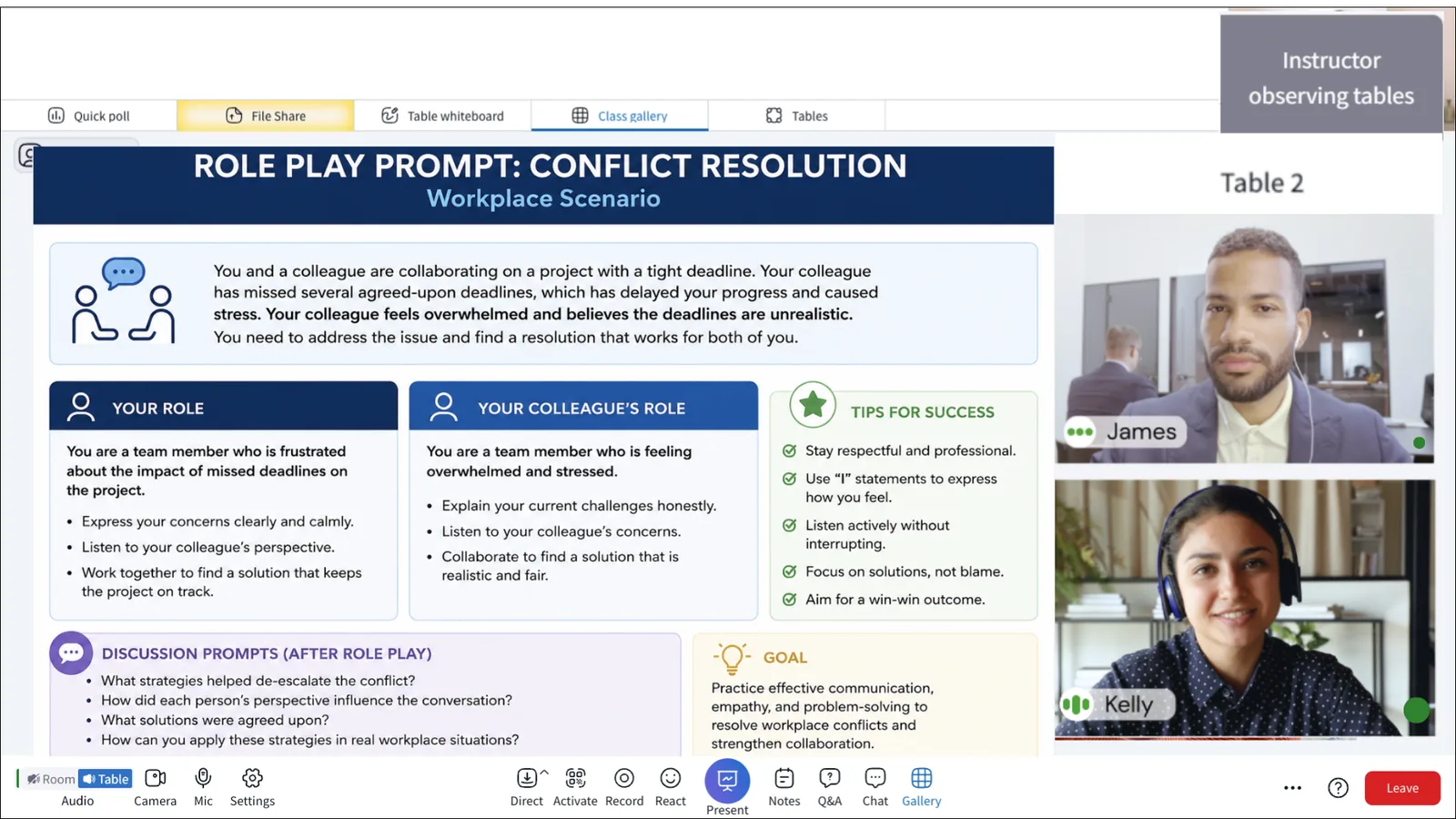
- Keep the live product working better — fix the problems that hurt real classes first. For example: instructors lost track of what was happening at each table once students split into groups, so we gave them one view of every table and a way to join or broadcast to all tables in a click. And a confusing join flow made classes start late, so we simplified joining and added a quick camera and mic check.
- Redesign the whole platform from zero — keeping every important feature, but turning a crowded, complex UI into something simple and intuitive — with a new information architecture, a new design system, and dozens of new features I invented for teaching online.
Research: what meeting tools miss
I led the research on two fronts:
- Our users. Together with Customer Success, I designed questionnaires for each persona — instructors, students and administrators. CS ran them with our customers, so we heard directly from people teaching and learning on the platform every day.
- The competition. A detailed audit of Zoom, Google Meet and other video platforms used for teaching — what they do well, and where they fail a real class.
The gaps were clear — general meeting tools were built for meetings, not for teaching:
| Meeting tools | What we designed instead |
|---|---|
| Breakout rooms that cut students off from the class | Virtual tables — small groups that stay inside the main session |
| Little insight into who is participating | Live engagement insights: speak time, polls, chat, notes, attendance |
| General meeting controls | Teaching controls: mics, chat channels, tools and safety for K-12 |
| Passive recordings | Interactive playback rooms with polls, quizzes and tracking |
| Add-ons for every activity | Built-in polls, quizzes, whiteboards, notes and games |
The platform
For instructors
- Move the class between whole-group and small-group work
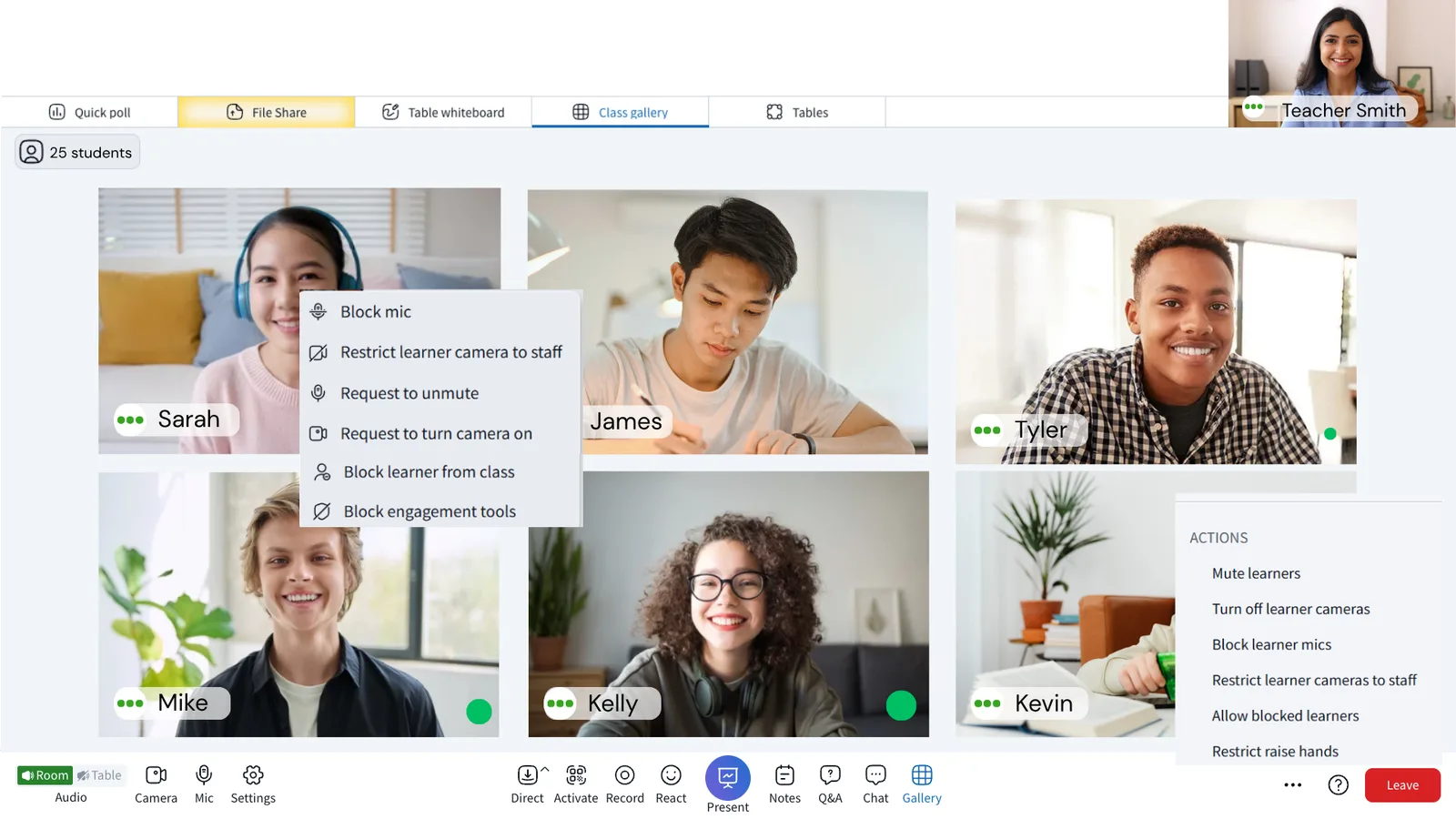
- Full control of mics, chat channels and tools
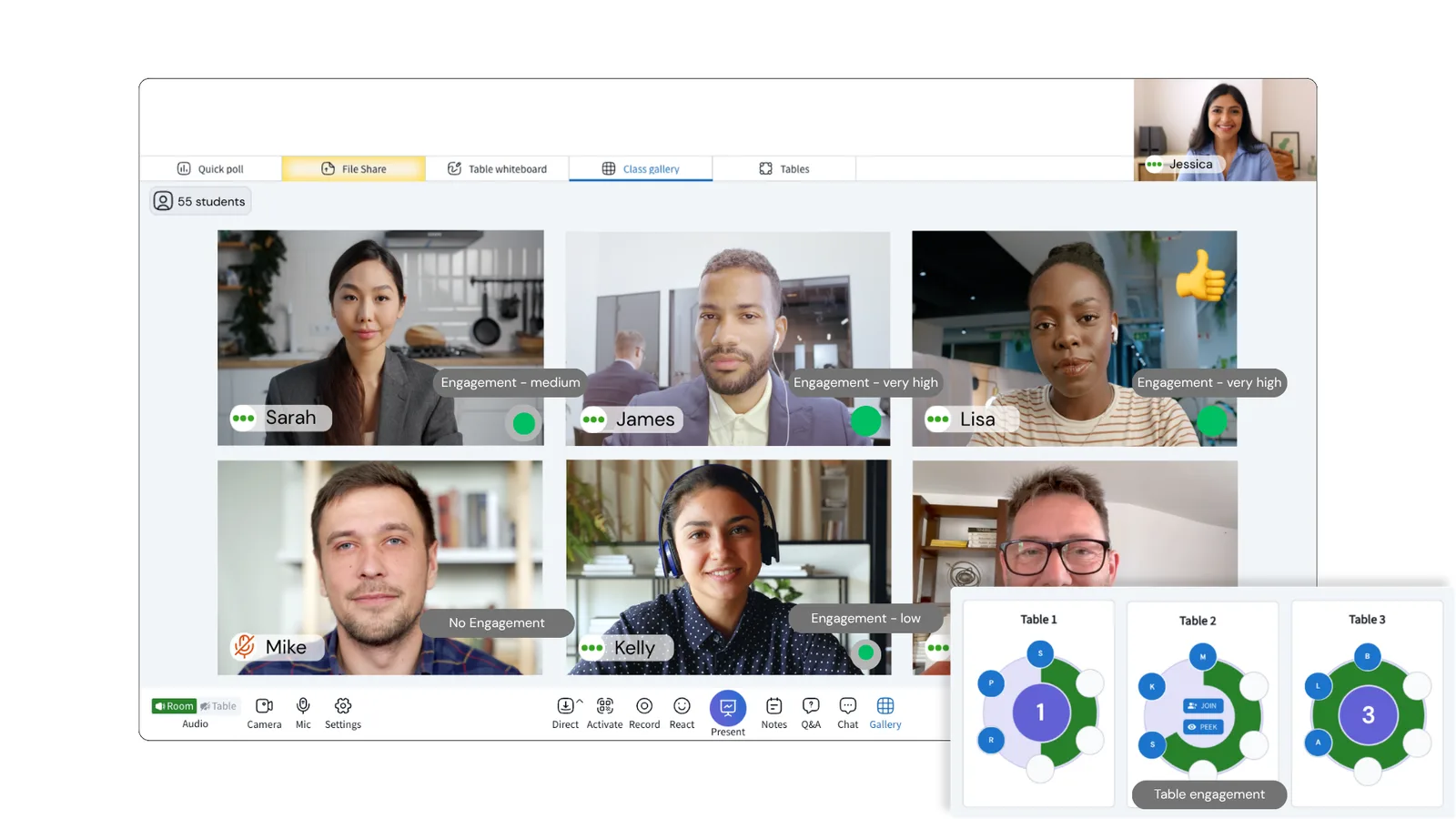
- Real-time engagement insights for every student
- Polls, quizzes, whiteboards and game-based sprints built in
For students
- Collaborate at virtual tables without leaving the class
- Answer knowledge checks and compete on leaderboards
- Shared whiteboards, notes and documents
- Interactive playback of recorded classes
AICON: a live AI concierge for instructors
Instructors can’t watch every metric while they teach. AICON watches for them — it notices when engagement drops, explains why, and suggests one concrete next step. It never acts on its own: the instructor always decides.


Signature features
These features started as my ideas. I defined them, designed them end to end, and brought them to life with product and engineering.
The whole class and every table, at once
The platform is built from dozens of features, but this one shows the thinking best. In meeting tools, an instructor has to choose: watch the whole class, or jump into a breakout room and lose everyone else.
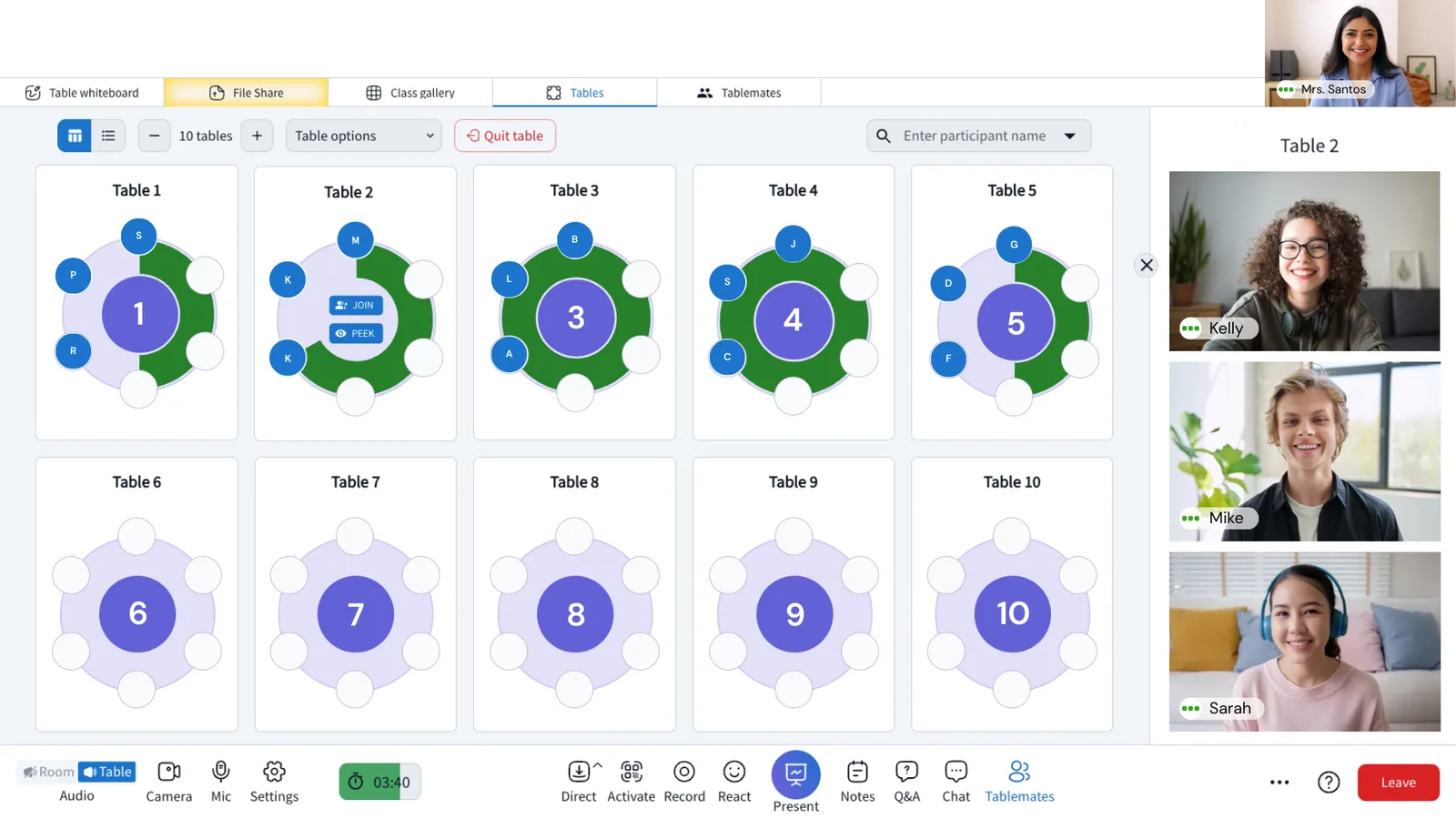
I designed a classroom where both happen together. The main stage keeps everyone on video and in the lesson, while a side pane shows every student — as a list, a grid, or seated at their tables. The instructor can see who is talking, who raised a hand and who needs help, and move between tables, without ever leaving the live class.

Map view: the whole classroom at a glance
With dozens of students spread across tables, instructors need to know where everyone is. The Map view shows every table and who is sitting at it, with signals like raised hands. Engagement shows on two levels: a live meter for each table (the green dots), and each student’s own engagement level, visible by hovering over them — so the instructor sees at a glance which group, and which student, needs attention. From the same view the instructor can make changes on the spot — move students, open a new table or rebalance groups.

After class: the analytics report
Every session ends with a report for the instructor. The top row shows the class at a glance — attendance, hand raises, instructor and learner talk time, poll participation, Q&A and chat — each compared with the previous session.
Below it, the engagement timeline lines up how engaged the class was with what was happening at that moment: whole-room or table time, and every activity — polls, PDFs, screen sharing, whiteboards and videos. An instructor can see which part of the lesson worked, and plan the next class around it.

More from the platform
A few more of the features I designed. Click any screen to see it full size.
Designing for AIThe AI Classroom Suite — designed end to end
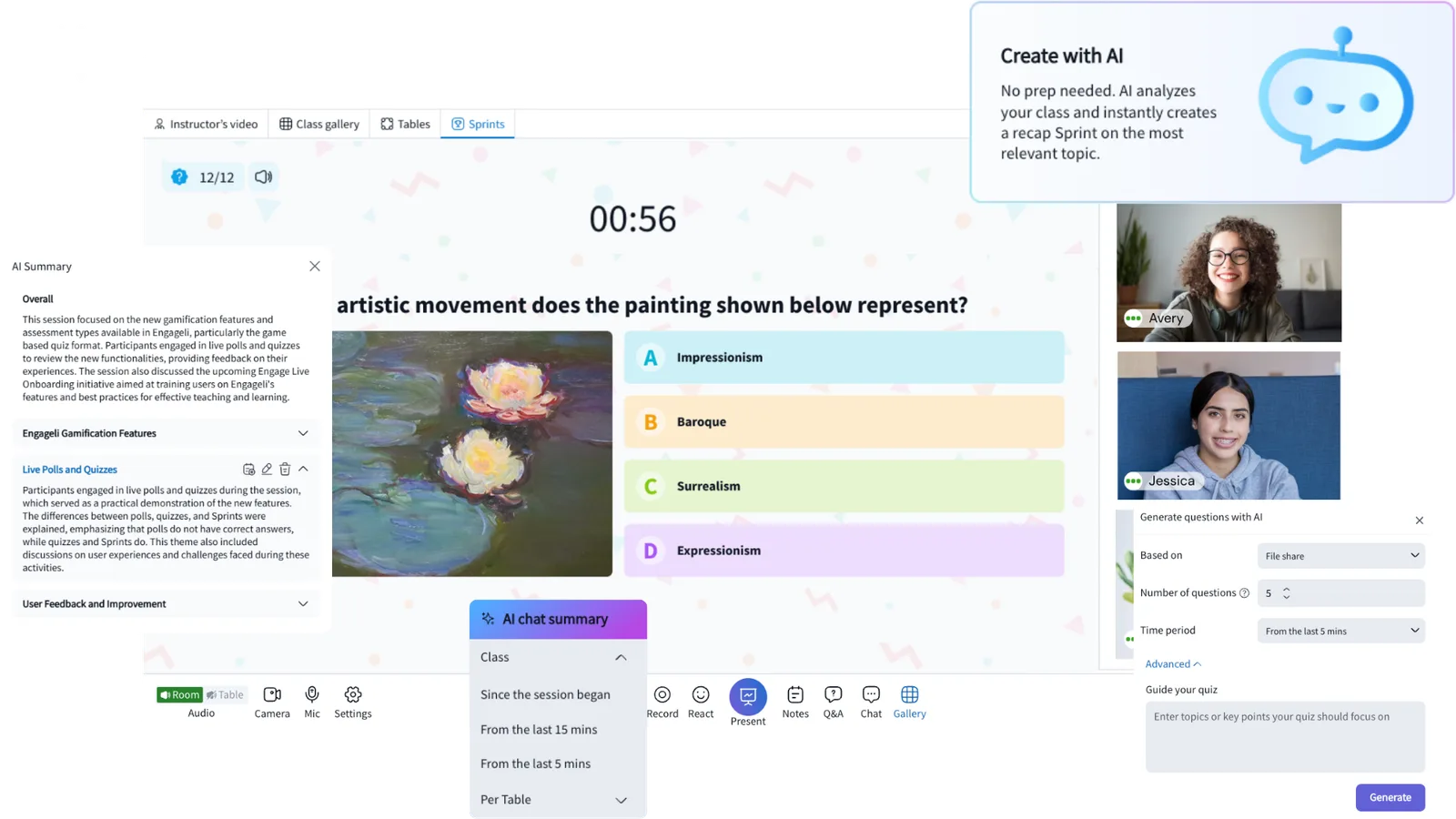
I defined and designed every AI product on the platform, for instructors and for students:
AI quizzes
Pop quizzes from the last 5 or 15 minutes of class, or the whole session — built from the discussion and the shared materials.
AI sprints
Turn a recent lesson into a timed, game-style knowledge check that shows gaps and misconceptions.
Chat & table summaries
A live recap of class sentiment, frequent questions and key topics — plus a summary of what happened at each table.
AI note-taker
Students summarize the last 15 minutes on request, saved to their notebook with timestamps — great for late joiners.
Class summaries
A topic-based summary after every session, which instructors can edit and students can add to their notes.
AI tutor & Studio
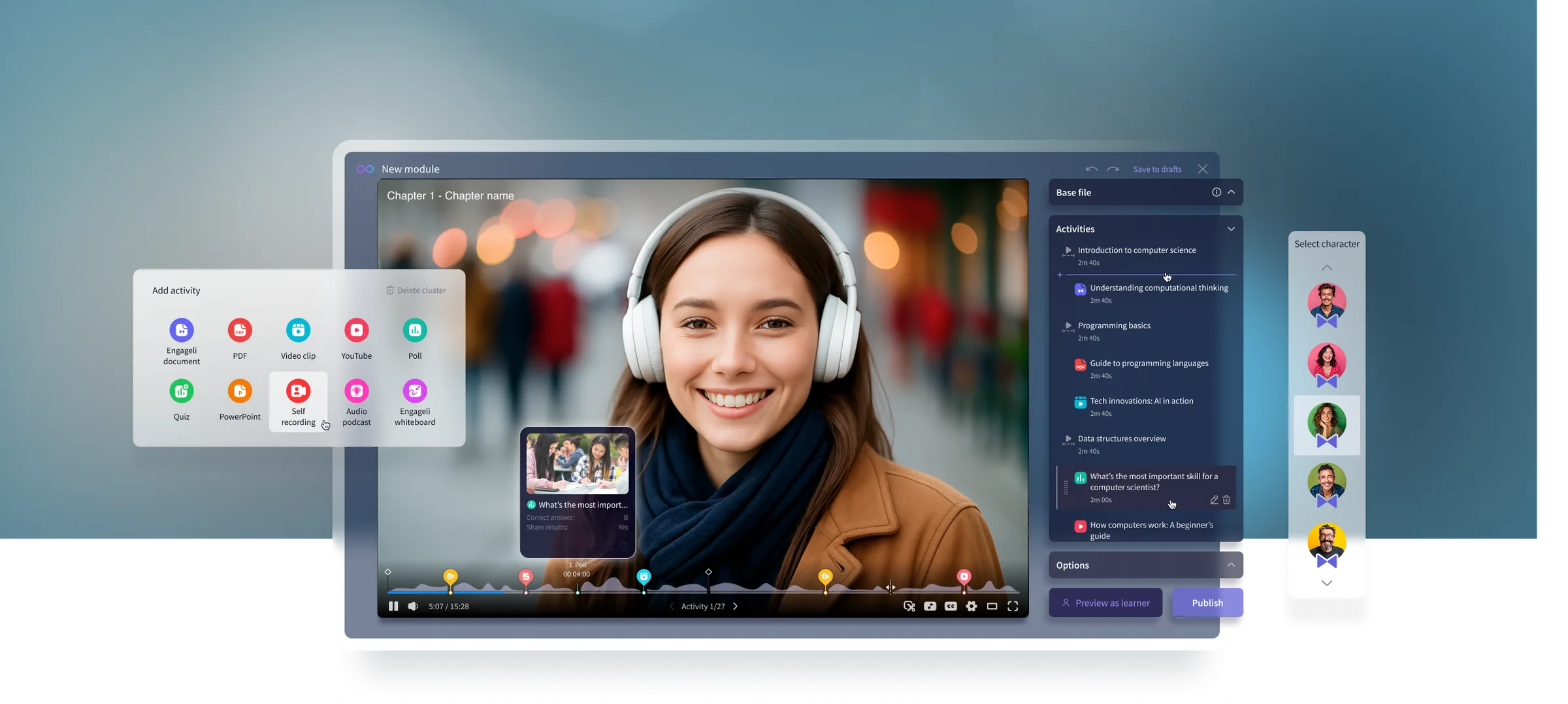
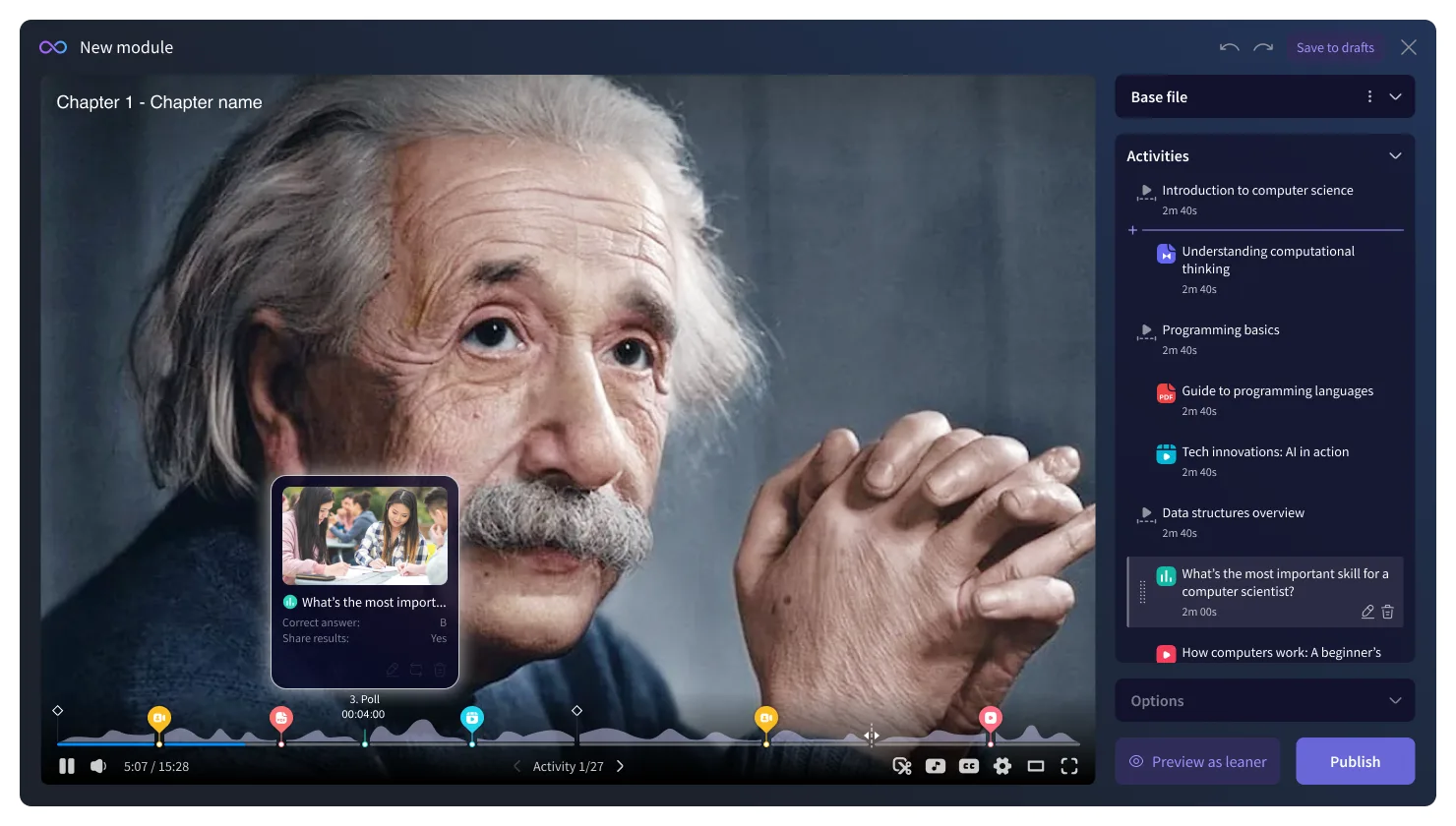
An adaptive tutor grounded in the instructor’s materials, and Studio, which turns recordings and slides into interactive modules.
How we earned instructors’ trust
- The instructor stays in control. AI quizzes, sprints and summaries are drafts — the instructor reviews and edits them before students see anything.
- Grounded in the class. The AI works only from the class discussion and the instructor’s own materials, so answers stay on topic.
- Checked for quality. Generated questions go through fairness and accuracy checks.
- Clearly labeled. AI content is always marked as AI, so nobody mistakes it for the instructor’s own words.
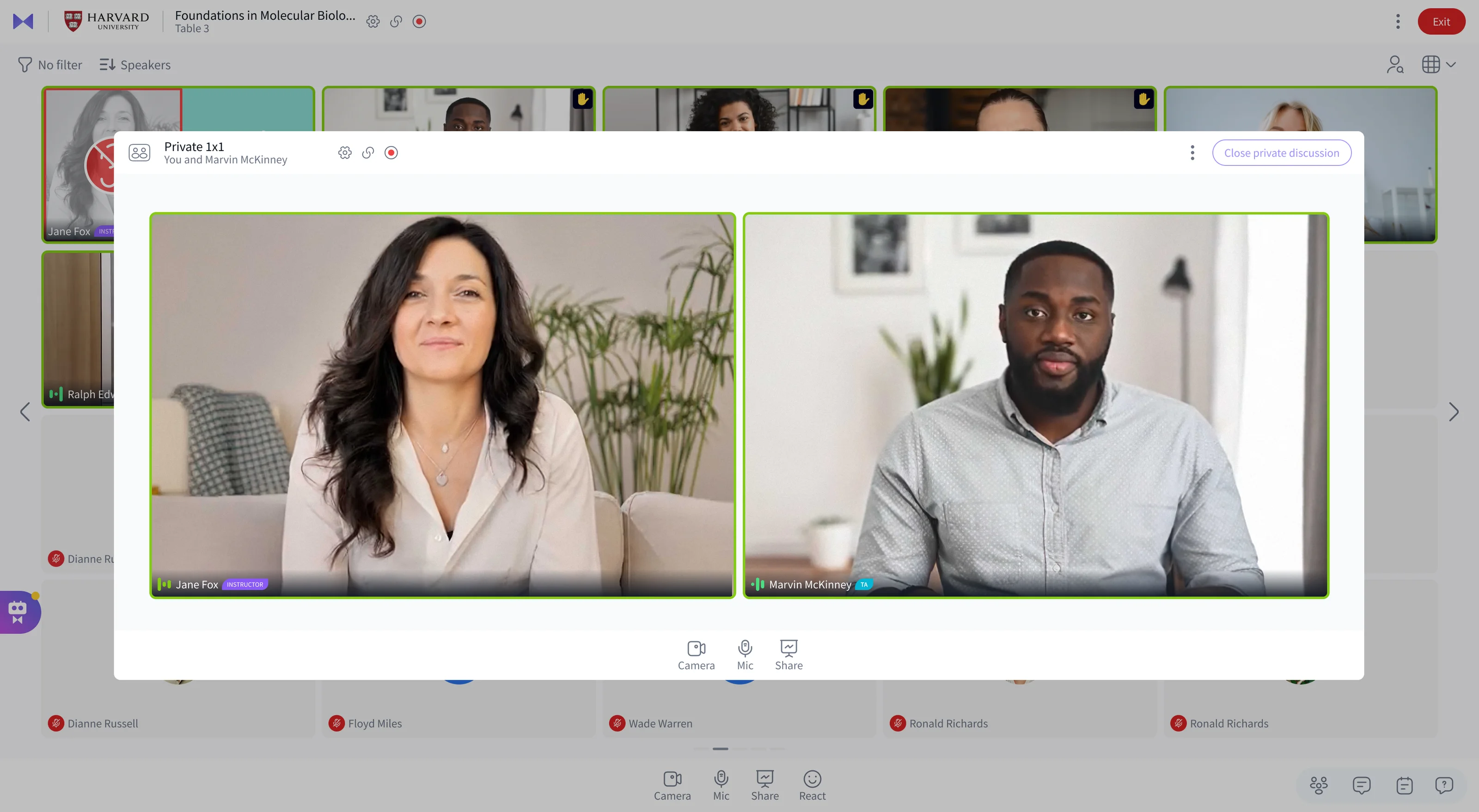
Private 1:1, in the middle of class
Sometimes a student needs a private word — a question they won’t ask in front of everyone, or extra help. I designed a private 1:1 the instructor can open with one student at any moment. The class stays live in the background, and one click brings the instructor straight back.
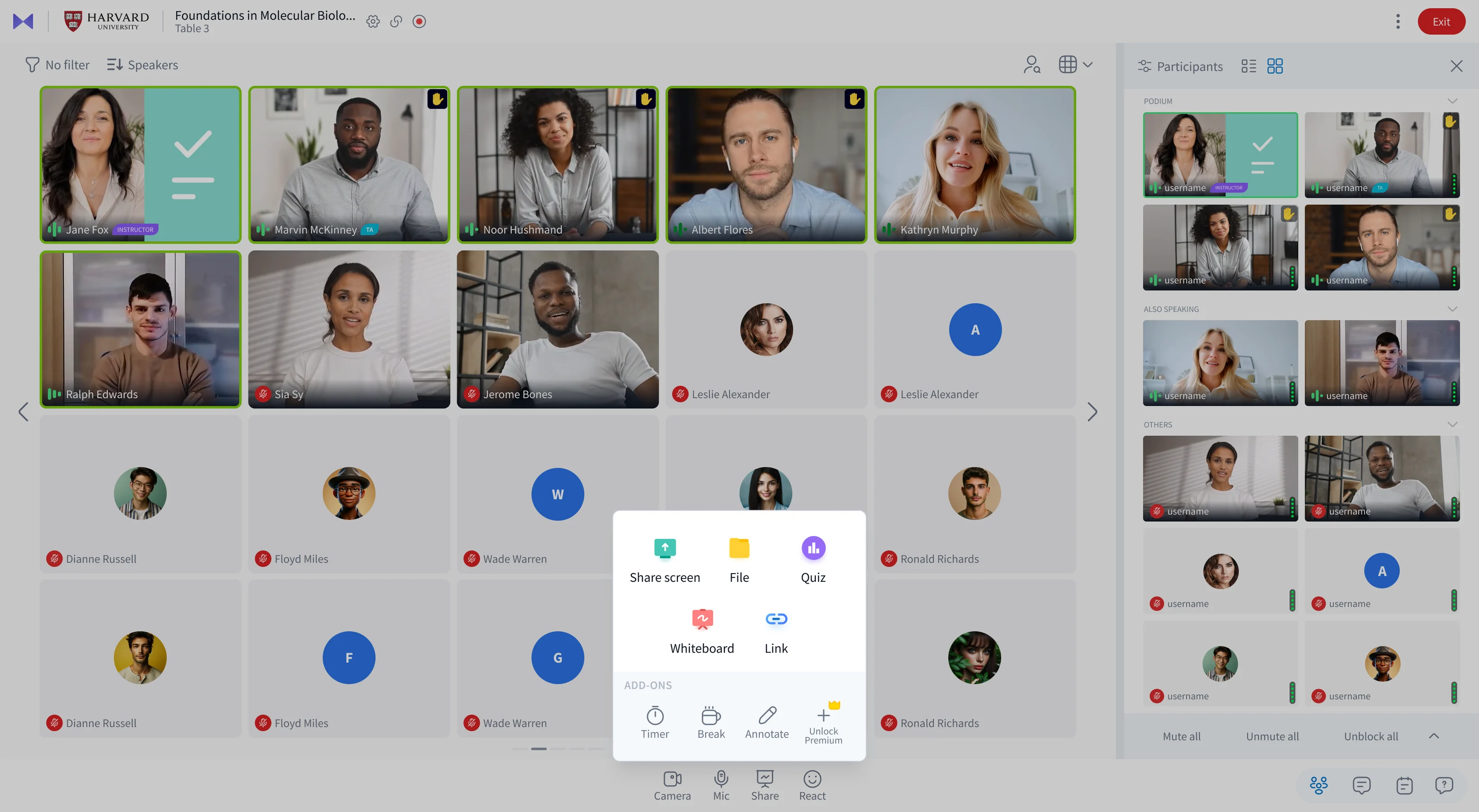
One Share menu for everything you teach with
Instructors used to hunt for tools in different places. I brought them into a single Share menu — screen, files, quizzes, whiteboard and links — with add-ons like a class timer, a break and live annotation one tap away, and room for premium tools. The participants pane next to it sorts the class automatically: who’s on the podium, who else is speaking, and everyone else.
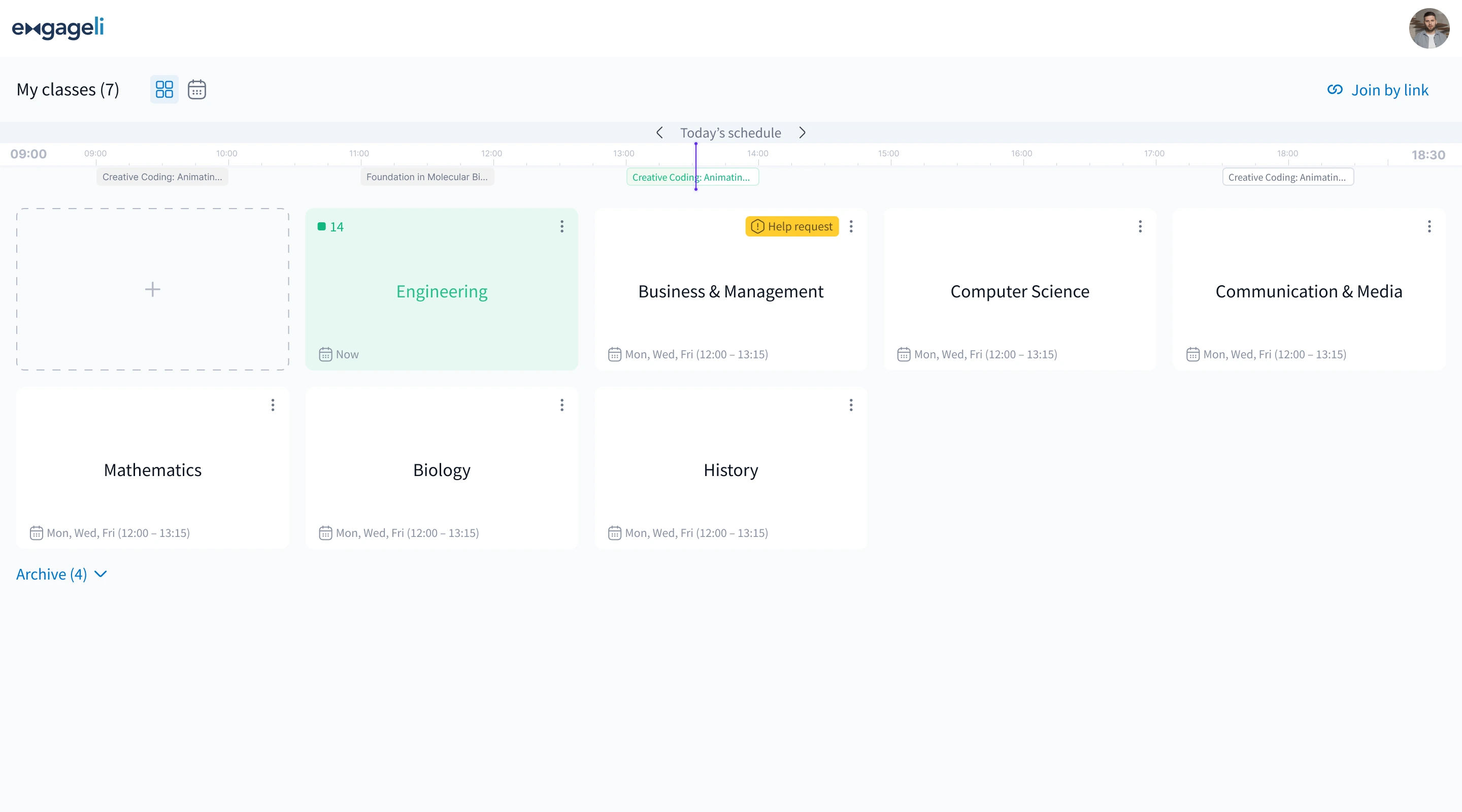
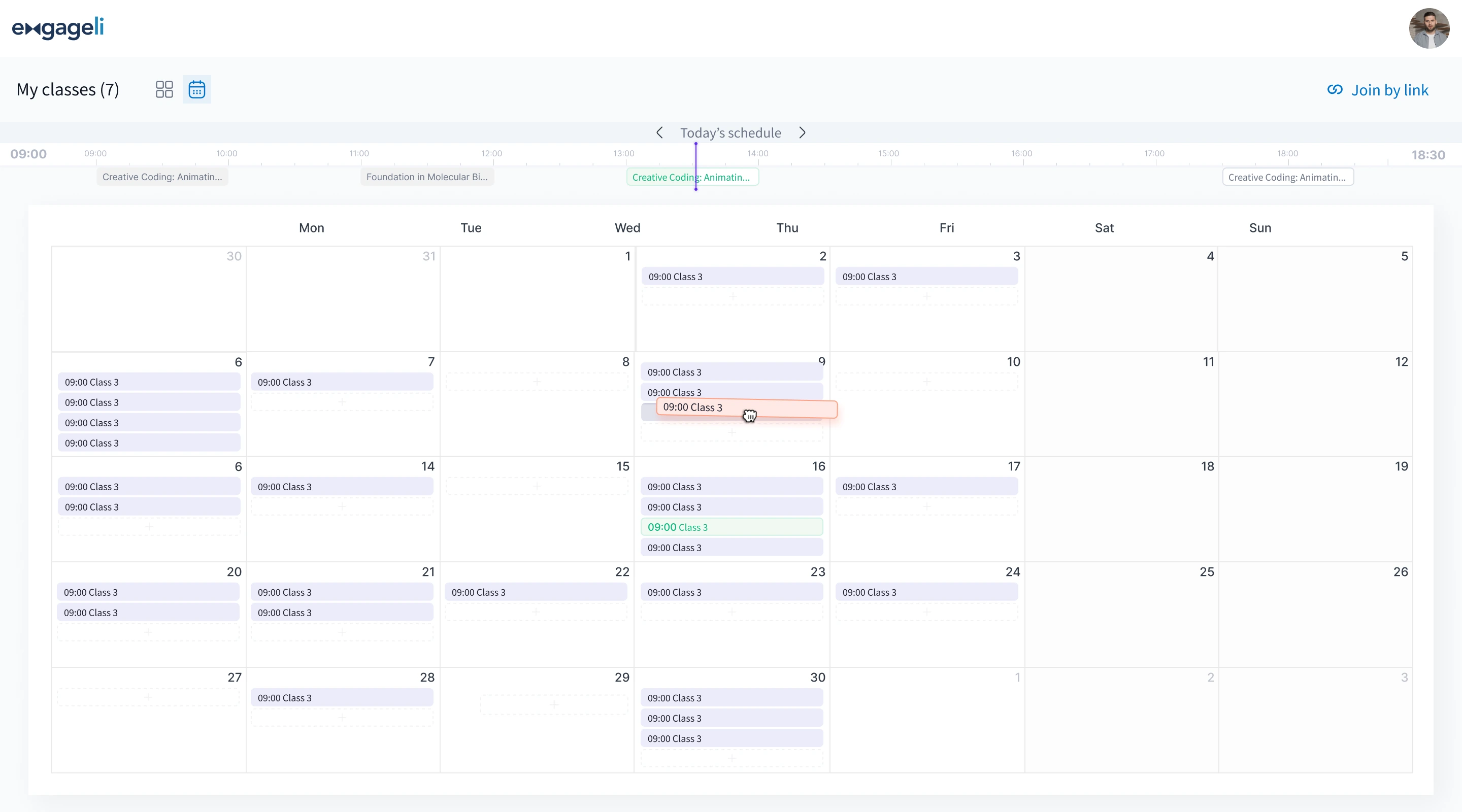
My classes: today, this week, and what needs attention
Instructors teach many classes a week. “My classes” shows them as cards or as a calendar — and a timeline across the top always shows where they are in today’s schedule. A live class lights up with the number of students already in it, a help request stands out, and classes can be rescheduled by simply dragging them to another day.
Screens from the shipped product · images: engageli.com
Spotlight: Engageli Studio
Studio, the AI course builder, turns recorded lectures into interactive self-paced courses. It’s one part of the platform, and has its own case study.
Impact
- Scope: the whole platform redesigned from zero — live classroom, engagement analytics, playback rooms and AI tools — for instructors, students and administrators.
- Team: design grew from one freelancer to a global team of 4 I hired and led.
- Customers: complaints about joining classes and managing tables dropped sharply after the first round of fixes.
- Business: the new interface became the centerpiece of sales demos.
- Reach: used by universities and K-12 districts in the US and Europe.
The platform today
92% term-to-term student retention (up from 78%) and 18% higher course completion in active virtual classrooms — as published by Engageli.
What I’d do differently now
Running the live product and the redesign in parallel was the right call, but I would set up shared success metrics with Customer Success from day one, so every fix and every new feature could be measured the same way. I would also bring instructors into co-design sessions earlier, alongside the questionnaires.
Hiring a design leader?
Let’s talk about how I can help your team.